Turn Any Scoring App Into a Complete Scouting Report
Play-by-play enrichment is live — paste text from your scoring app, and GameLense transforms it into spray charts, plate discipline breakdowns, opponent scouting reports, and situational performance metrics that no CSV box score can provide. Every game your team plays now becomes a full scouting report, all from a simple copy-and-paste.
This works everywhere in GameLense — your coaching dashboard, parent portals, email insights, AI assistant context, and the development reports your families receive. Here's exactly how it works and what it unlocks.
How It Works
The process takes about 30 seconds per game. No file exports, no accounts to connect, no third-party integrations to configure.
Step 1: Find Your Game
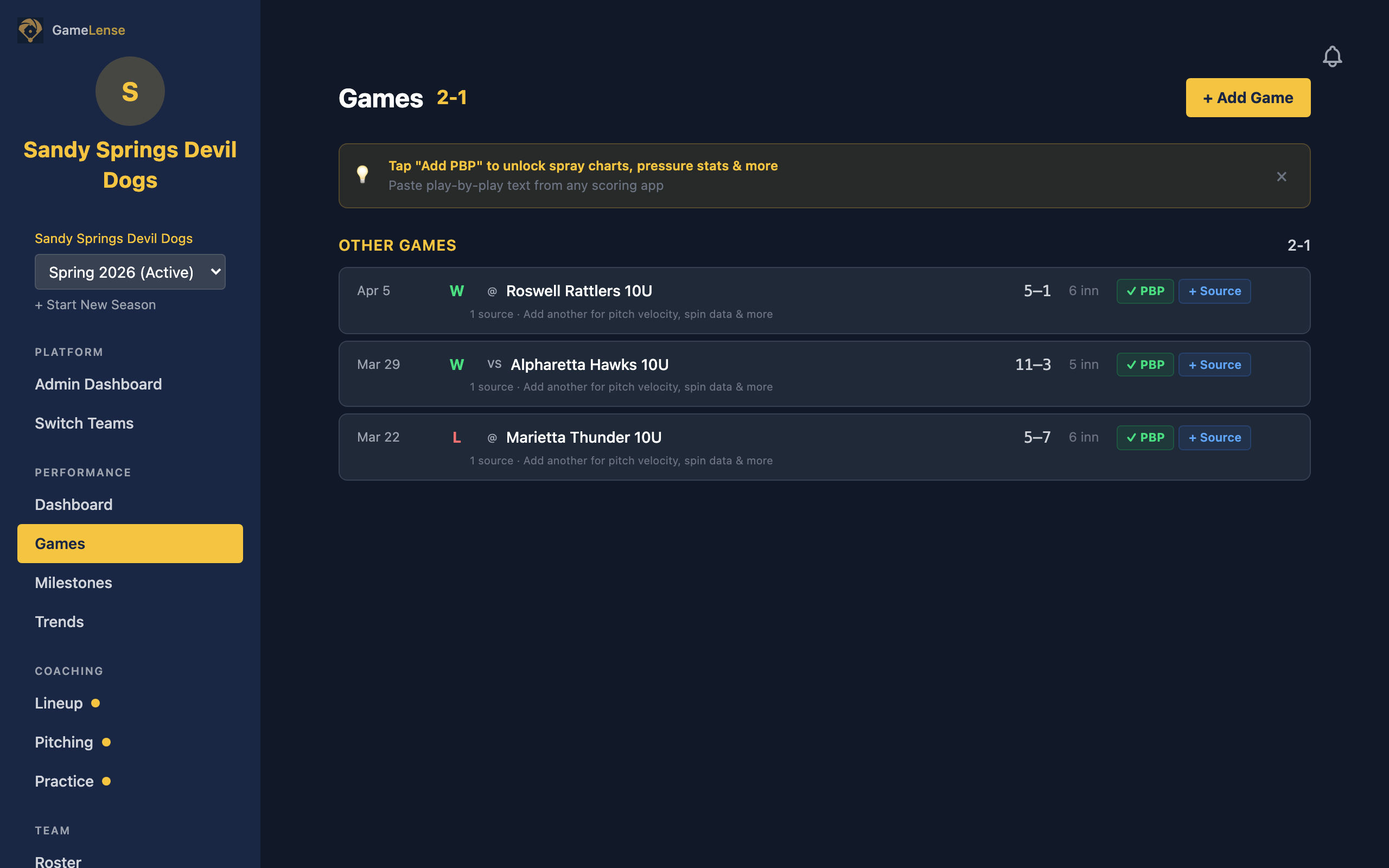
Navigate to your team's Games page. Each game row now shows PBP status — a green "PBP" badge when play-by-play data exists, plus blue "VELO" and purple "PITCH TYPE" badges when pitch-level data is available from your scoring platform.
Games without PBP data show a gold Add PBP button. Games that already have one data source show a blue + Source button — GameLense supports multiple PBP sources per game for layered enrichment.
Step 2: Copy Play-By-Play Text
Open your scoring app — GameChanger, DiamondKast, iScore, or whatever your league uses — and navigate to the Plays tab for the game. Select all the text and copy it.
You're copying the raw play-by-play text. Not a screenshot, not a CSV export. The running play log that describes every at-bat, pitch sequence, and fielding play.
Step 3: Paste Into GameLense
Tap Add PBP on the game row. A paste field opens. Paste your copied text and tap Parse Plays.
GameLense automatically detects which scoring platform the text came from — no dropdown, no manual selection. The parser identifies the format, extracts every play, and shows you a preview with:
Step 4: Review and Save
If the preview looks right, save it. GameLense stores the original text (so it can be re-parsed as the parser improves), matches player names against your roster, infers pitcher changes from the pitch sequence, and triggers the full enrichment pipeline.
Within seconds, that game is enriched with six new data layers.
What You Unlock
Play-by-play data gives your team visibility that CSV box scores simply cannot provide.
Spray Charts
Every batted ball is plotted on a field diagram based on the fielding route described in the play text. Dots are color-coded: green for hits, red for outs, gold for errors reached on. Dot size reflects hit type — ground balls are smaller and shallow, fly balls larger and deeper. Hard-hit balls get an outer ring indicator so you can spot quality contact at a glance.
Combined with each player's batting side, GameLense calculates pull rate, center rate, and opposite-field rate — the spray tendencies that help coaches design pitch sequences and shift alignments.

Plate Discipline
Every pitch in the play-by-play is tokenized and analyzed. GameLense extracts discipline metrics that no box score touches:
These metrics are broken down by count — you can see how a player's approach changes from 0-0 to 0-2 to 3-1. When DiamondKast data is available, plate discipline also breaks down by velocity band and pitch type, so you can see whether a hitter struggles with off-speed or gets caught chasing high fastballs.
Situational Performance
GameLense simulates base-state changes play-by-play to compute metrics that only exist in the play sequence:
Each of these generates a dedicated insight card on your dashboard. Coaches and parents both see them.
Self-Scout Reports
The Self-Scout page aggregates all your PBP data into a team-wide scouting report on your own squad:

Opponent Scouting Reports
Every game's play-by-play captures both teams. GameLense aggregates opponent data across all your matchups to build scouting reports automatically:
The next time you face the same team at a tournament, your scouting report is already built from every previous matchup.

Pitch Velocity and Pitch Type (DiamondKast)
When play-by-play text comes from DiamondKast, GameLense extracts per-pitch velocity in MPH and pitch type classification — fastball, curveball, changeup, slider, and more. This adds:
DiamondKast games show blue "VELO" and purple "PITCH TYPE" badges on the Games page. You can add multiple PBP sources per game — paste GameChanger for the play descriptions AND DiamondKast for the pitch data, and both layers merge into one enriched view.
Supported Platforms
GameLense auto-detects the scoring platform from the pasted text. No manual selection required.
Currently optimized for:If you paste text from iScore, GameBook, TeamSnap, or another app and the parser can't recognize the format, a built-in "Import not working?" form captures your data so we can add support. Every submission directly improves the parser for everyone using that platform.

Parent Pro: Your Player, Your Data
Parents with a Parent Pro subscription can upload play-by-play data independently — no coach required. The flow is the same paste-and-parse experience, with one addition: GameLense fuzzy-matches the parsed data to your linked player using last name, first initial, stored aliases, and Levenshtein distance.
Only your player's stats are extracted and saved. The full game is parsed, but only your child's at-bats, fielding plays, and plate appearances flow into their profile. Parents can build a complete picture of their player's development even if their coach isn't using GameLense.
PBP-enriched parent data feeds into AI development reports, giving families richer, more contextual insights about their player's growth over time.
Get Started
Head to your Games page, pick any completed game, and tap Add PBP. In 30 seconds, that game becomes a full scouting report.
Not on GameLense yet? Start your free trial at gamelense.app — play-by-play enrichment is included for every team on every plan.
See these stats in action
GameLense calculates these stats automatically from your team's GameChanger data.
Start your free trial